DMR Activity Dashboard
Important: this is used through a web browser only
The DMR Activity Dashboard is not designed to be used with a monitor, keyboard and mouse plugged into the Pi. The Pi sits on its own, with only power connected, and does its work in the background.
To see the dashboard, open a web browser (Safari, Chrome, Edge or Firefox) on a computer, tablet or phone that is on the same home network as the Pi, and go to http://dmr-dashboard.local:8095.
If you plug a monitor into the Pi, you will not see the dashboard. You will only see text from Raspberry Pi OS.
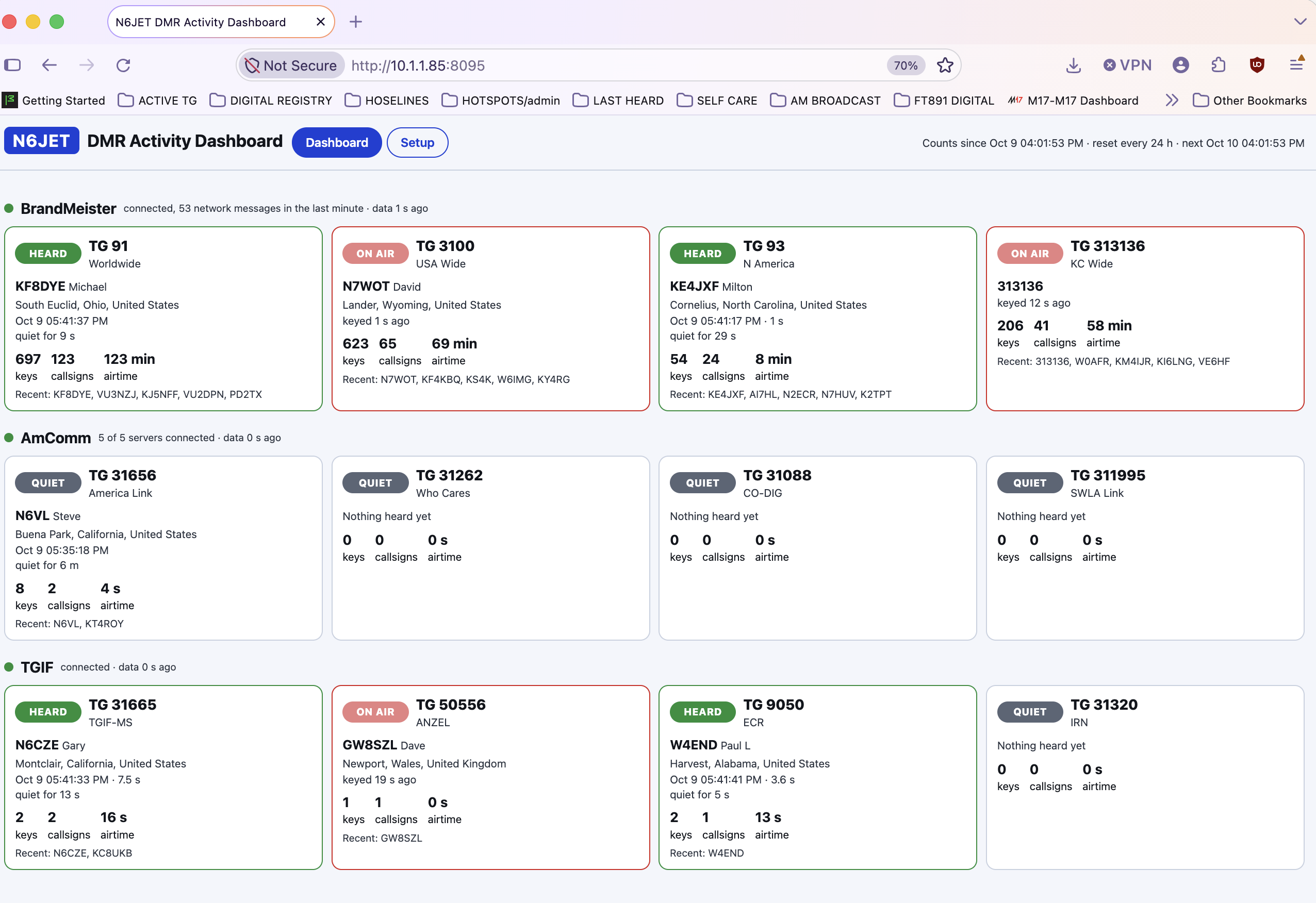
The DMR Activity Dashboard shows, at a glance, which DMR talkgroups are active right now. It runs on a Raspberry Pi and you view it in a web browser on any computer, tablet or phone on your home network. No radio or hotspot is needed. It watches the networks' live activity over the internet.
It covers eight networks: BrandMeister, TGIF, FreeDMR, ADN, AmComm, Ham United, QuadNet and System X. You pick the talkgroups you care about, up to 64 per network, and each one gets its own box showing:
- ON AIR when someone is talking, HEARD when there was recent traffic, and QUIET when nothing has been heard
- The callsign, name and location of the last station heard
- How many times it was keyed, how many different callsigns, and the total airtime
- The most recent callsigns heard
Counts reset every 24 hours.
Setting it up
- Download dmr-dashboard-image-v1.13.img.xz with the button above.
- Don't open it. Leave it as it is in your Downloads folder.
- Open Raspberry Pi Imager, choose Use custom, and pick the .img.xz file.
- Pick your microSD card (4 GB or larger) and click Write. Imager unpacks the file as it writes.
- Drop on your Wi-Fi file and boot. Make a
wpa_supplicant.confwith the Pi-Star Wi-Fi builder, drag it onto the card's bootfs drive, eject the card, put it in the Pi and plug in the power. Give it about 3 minutes the first time. - Open the dashboard at
http://dmr-dashboard.local:8095in your browser. - Choose your talkgroups. Click Setup, log in with
dmr/dmr, turn on your networks, add your talkgroups and click Save.
After that it just runs. Unplug it and plug it back in, and it comes back on its own with your settings.
Good to know
- If you plug a monitor into the Pi anyway, you will see a blue box asking you to create a new username. You do not need one. Leave it alone and open the dashboard in your browser as usual. The dashboard is already running behind it.
- If
dmr-dashboard.localdoes not open, use the Pi's address from your router instead, for examplehttp://192.168.1.50:8095. - To change Wi-Fi networks, make a new
wpa_supplicant.confand drop it on the card in place of the old one.
73, Chris, N6JET